

What Is a Computer?
A computer is an electronic device that accepts data as input, processes it according to a set of instructions, stores information, and produces meaningful results as output. Computers have become an essential part of modern life and are used in education, business, communication, healthcare, banking, government services, entertainment, and many other fields.
For students, understanding the basic concepts of computers is especially important because computer fundamentals form the foundation for learning programming, networking, databases, operating systems, and other areas of information technology.
How Does a Computer Work?
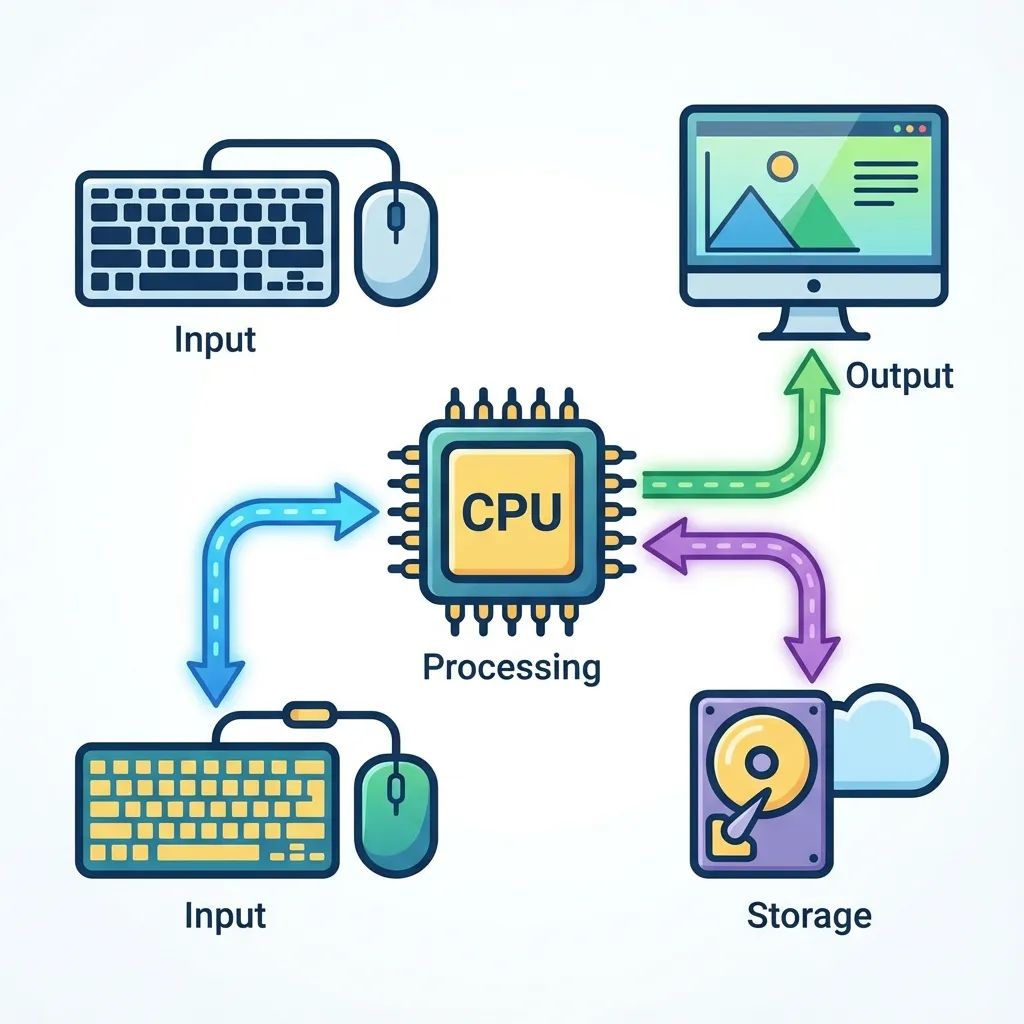
A computer generally works through four basic stages:
1. Input
Input is the data or instructions provided to a computer. Input devices allow users to communicate with the computer.
Examples include:
- Keyboard
- Mouse
- Microphone
- Scanner
- Webcam
- Touchscreen
For example, when you type your name using a keyboard, the keyboard sends that information to the computer as input.
2. Processing
After receiving input, the computer processes the data according to the instructions provided by the user or software.
The Central Processing Unit (CPU) is mainly responsible for processing instructions. It performs calculations, logical operations, and controls many activities of the computer.
3. Output
After processing the input, the computer produces a result called output.
Common output devices include:
- Monitor
- Printer
- Speaker
- Projector
For example, when you type a calculation into a calculator application, the answer displayed on the screen is the output.
4. Storage
Computers also need to store data and information so that it can be used later.
Common storage devices include:
- Hard Disk Drive (HDD)
- Solid State Drive (SSD)
- USB flash drive
- Memory card
- Optical discs
Modern computers also use cloud storage to store and access files over the internet.
Main Components of a Computer
A computer system consists of several important components. They can broadly be divided into hardware and software.
Hardware
Hardware refers to the physical parts of a computer that we can see and touch.
Examples include the motherboard, CPU, RAM, keyboard, mouse, monitor, and storage devices.
Software
Software refers to the programs and instructions that tell computer hardware what to do.
Software can be broadly classified into:
- System software — Operating systems and other software that manage computer hardware.
- Application software — Programs designed to help users perform specific tasks.
Examples of application software include web browsers, word processors, media players, and image-editing applications.
What Is a CPU?
The Central Processing Unit (CPU) is commonly known as the brain of the computer. It executes instructions and performs calculations and logical operations.
A CPU generally performs three important functions:
- Fetch — Retrieves instructions from memory.
- Decode — Understands what the instruction means.
- Execute — Performs the required operation.
This process is commonly called the instruction cycle.
What Is RAM?
Random Access Memory (RAM) is the temporary memory used by a computer while programs are running.
For example, when you open a web browser, the operating system loads the necessary data into RAM so that the CPU can access it quickly.
RAM is volatile memory, meaning that its contents are generally lost when the computer is turned off.
What Is an Operating System?
An Operating System (OS) is system software that manages computer hardware and provides an environment for running applications.
Popular operating systems include:
- Windows
- Linux
- macOS
- Android
- iOS
The operating system manages resources such as memory, storage, processes, files, and connected devices.
Types of Computers
Computers can be classified into different types based on their size, processing capability, purpose, and usage.
Supercomputer
Supercomputers are extremely powerful computers designed to perform highly complex calculations. They are used in areas such as weather forecasting, scientific research, space research, and simulations.
Mainframe Computer
Mainframe computers are powerful systems designed to handle large amounts of data and many users simultaneously. They are commonly used by large organizations such as banks and government institutions.
Server
A server is a computer or system that provides services or resources to other computers over a network.
For example, a web server can deliver websites to users when they access a website through a browser.
Personal Computer
Personal computers are designed primarily for individual users. Desktop computers and laptops are common examples.
Mobile Computer
Smartphones and tablets are examples of mobile computing devices. They provide many computer-like capabilities in portable forms.
Characteristics of Computers
Computers have several important characteristics:
Speed
Computers can process large amounts of data in a very short time.
Accuracy
Computers can produce highly accurate results when the input and instructions are correct.
Storage Capacity
Computers can store large amounts of data and retrieve it when required.
Automation
Once properly instructed, computers can perform tasks automatically with little human intervention.
Versatility
A computer can be used for many different tasks, including writing documents, programming, browsing the internet, editing media, and analyzing data.
Diligence
Unlike humans, computers do not normally become tired or lose concentration while repeatedly performing the same operation.
Uses of Computers
Computers are used in almost every sector of modern society.
Education
Students and teachers use computers for online classes, research, presentations, assignments, programming, and digital learning.
Banking
Banks use computers to manage accounts, transactions, ATMs, online banking, and financial records.
Healthcare
Computers help hospitals and healthcare organizations manage patient records, medical imaging, laboratory systems, and administrative tasks.
Business
Businesses use computers for accounting, communication, inventory management, customer management, marketing, and data analysis.
Government
Government organizations use computer systems for maintaining records, delivering digital services, processing applications, and managing public information.
Communication
Email, messaging applications, video conferencing, and social media all depend heavily on computer technology and networks.
Advantages of Computers
Some major advantages of computers include:
- High processing speed
- Large storage capacity
- High accuracy
- Automation of repetitive tasks
- Easy access to information
- Improved communication
- Increased productivity
Limitations of Computers
Despite their advantages, computers also have limitations.
A computer cannot normally make decisions independently in the same way humans do unless it has been programmed or designed to do so. It depends on instructions, data, hardware, and software.
Other limitations include:
- Dependence on electricity or battery power
- Security and privacy risks
- Malware and cyberattacks
- Hardware failures
- Incorrect results when incorrect data or instructions are provided
Computer: Quick Revision
For students preparing for examinations, remember these basic points:
Topic
Key Point
Computer
Electronic device that processes data
CPU
Executes instructions and processes data
RAM
Temporary/volatile memory
Storage
Used for long-term data storage
Hardware
Physical components of a computer
Software
Programs and instructions
Input
Data provided to the computer
Output
Result produced by the computer
Operating System
Manages hardware and software resources
Conclusion
Computers have transformed the way people learn, work, communicate, and manage information. Understanding basic computer concepts provides a strong foundation for further study in information technology.
Whether you are a BCA student, a computer learner, or preparing for a computer-related competitive examination, having a clear understanding of computer fundamentals can make advanced IT topics much easier to learn.
At Santosh Academy, our goal is to make technical and educational concepts easier to understand through practical, structured, and student-friendly learning resources.